
How it works
That single rule is why the platform is shaped the way it is. It decides what the screens show, what the client can see, what gets logged and what can never happen automatically — no matter how busy the week is.
The path a month takes
Balance sheet, profit and loss for the month, the year to date, the general ledger and cash flow — pulled on the client's own income tax basis, read once, and shared by every agent that runs. No agent queries the accounting system on its own.
Close review, fixed assets, loans, leases, sales tax — each looking only at what it is scoped to see, each applying the firm's own thresholds rather than a vendor's defaults.
Was anything bought or disposed of this period? Was that loan paid off or was the payment missed? The question and the client's answer are logged against that period's close, and the agent waits for the answer instead of guessing.
Each one shows the underlying transactions, the source document, the entry that would fix it and what changes if it is approved — not just a conclusion with a confidence score.
Approve, send back, or ask the client. Your firm defines who that is and up to what amount — a partner, a CPA, the owner of a bookkeeping practice, a senior on their own limit. Staff work to their own approval limit; anything above it visibly sits with the person above them. There is no bulk approve, and there is no way to skip this step under deadline pressure.
Posted against the named person who approved it, with reversing entries dated and linked automatically, closed periods protected and duplicates blocked — then read back to confirm it landed as intended.
With prior-year and year-to-date comparatives this time, so year-over-year comparison happens on closed numbers rather than mid-close noise.
Under the subscribing firm's branding, with any remaining open items disclosed in the compilation letter rather than quietly left out — and released to the client by a named person.
Two gates
Most platforms guard the way in. PivotSolvo guards both directions, because the risk to a firm runs both ways: work reaching a client before it was reviewed, and work starting before anyone agreed to do it.
Nothing crosses to the client side until a named person at the firm releases it. Proposed entries, exceptions, internal status vocabulary and draft numbers do not exist in the client's view — not hidden, not greyed out, simply not there.
Consequence: a client can never see a number the firm has not stood behind.
What a client asks for lands in the firm's queue, and someone at the firm accepts it with a scope note before any work begins. Cheap, bounded items — booking a meeting, requesting a copy of a released document — auto-accept against a monthly cap the firm sets per catalog item.
Consequence: no unpriced work quietly starts itself.
Beyond the close
The reason firms do less advisory work than they would like is rarely that they lack the insight. It is that by the time the books are right, the month is gone and the client has already made the decision. PivotSolvo compresses that gap, and then runs a second set of agents off the same record — so the advisory work is a continuation of the close rather than a separate engagement someone has to find time for.
A rolling thirteen-week cash forecast built from receivable and payable aging, payroll cadence, the loan schedules the platform already holds and the filing calendar. Plain-language variance commentary in the monthly package, benchmarking across the firm's whole book, and receivable and covenant trends before they become a phone call.
Reasonable compensation, entity structure and the S-corporation election, retirement plan choice and the QBI interaction, owner distributions against basis, the accountable plan for owner spend running through the books, estimated tax and safe harbor. The point is that these are found across every client at once rather than whoever happens to come up in conversation.
Normalized earnings with owner add-backs, market multiples, a discounted cash flow fed by the forecasting agent, exit readiness, the gap between what the owner needs and what the business is worth, deal structure and succession paths. It produces calculation-engagement support under the AICPA valuation standards for a CPA to complete and sign.
Buy or lease the equipment. Hire or contract. Keep it in house or outsource it. Take the big job. Add the location. Buy the building instead of renting it. Each one has a real model behind it rather than an open-ended chat, and each one runs on loan, lease and fixed asset data the platform is already holding.
Advisory runs through the same two gates as everything else. Nothing reaches the client until the firm releases it — and a client asking for advisory work waits for a scope note, which is how advisory stays priced instead of quietly absorbed.
Screen by screen
These are the working screens, not marketing renders.
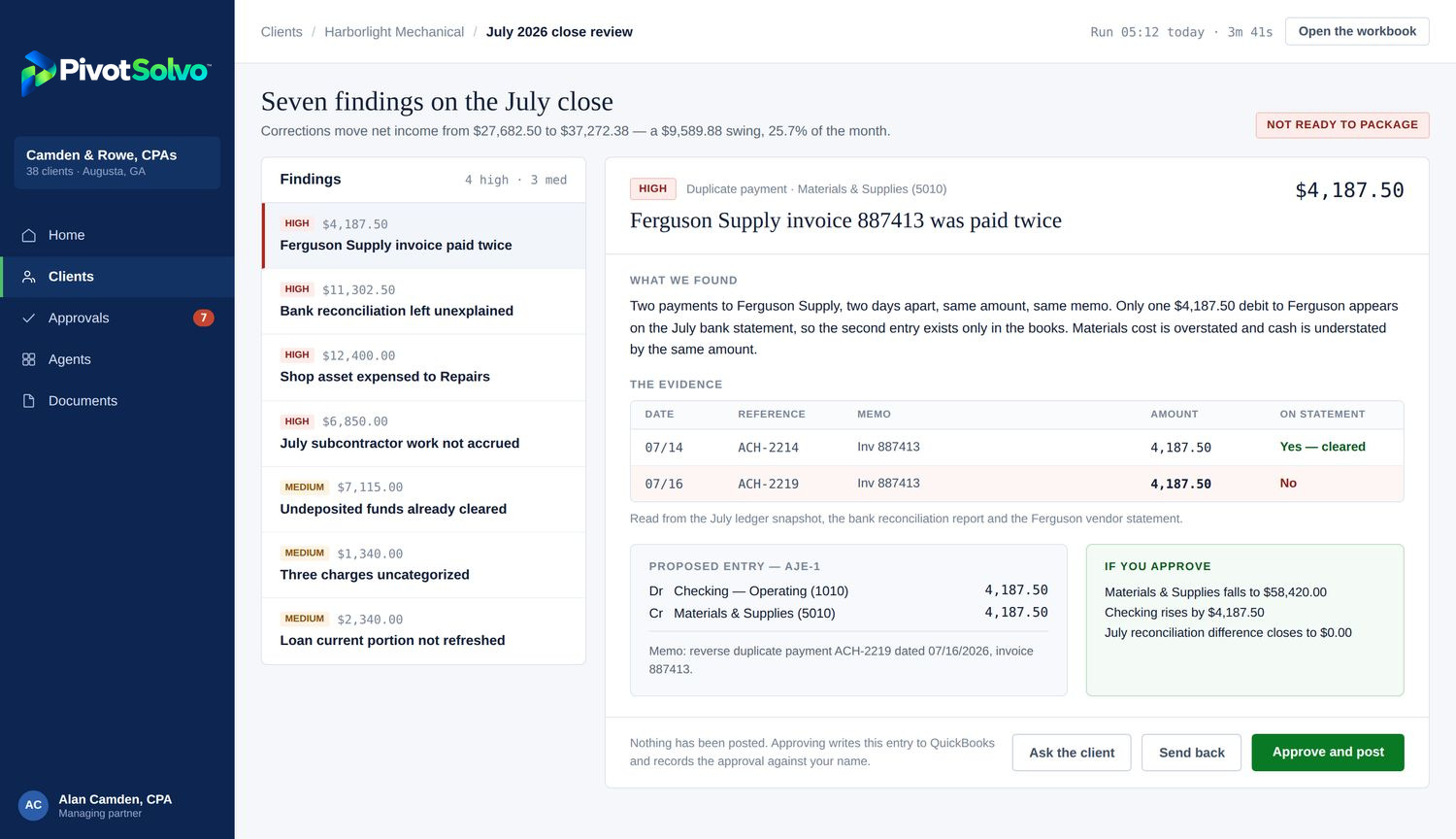
One finding at a time, with the two ledger rows side by side against the bank statement column, the entry it would post, and what changes to the statements if it is approved. Three buttons — approve, send back, ask the client — and a line underneath that says plainly that nothing has been posted.
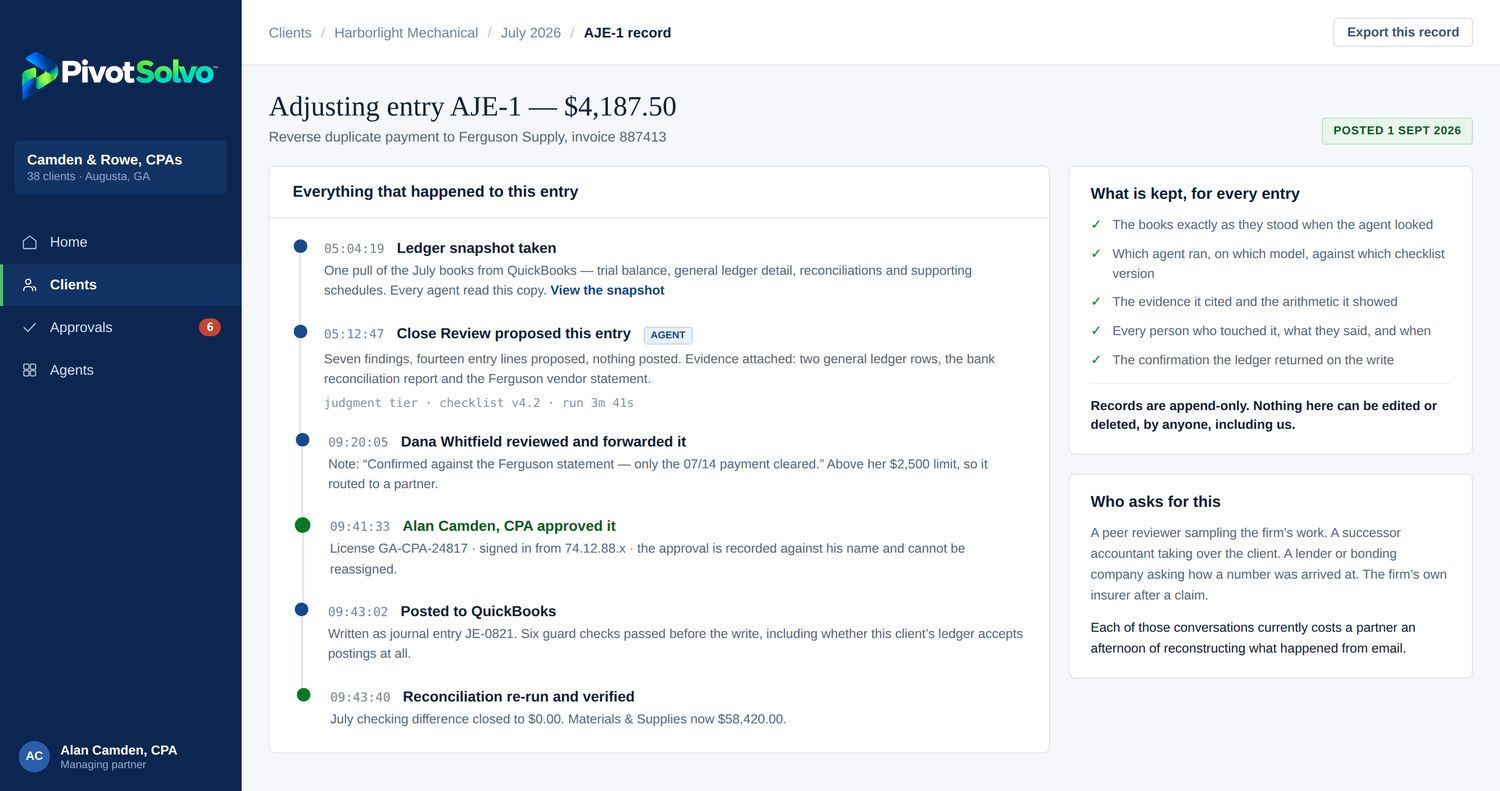
One entry end to end: the snapshot the agent read, what it proposed and on what basis, the staff note, the approval recorded against the person who gave it, the write to the accounting system and the verification that it landed. Append-only. This is the answer to how would you defend this in a peer review.
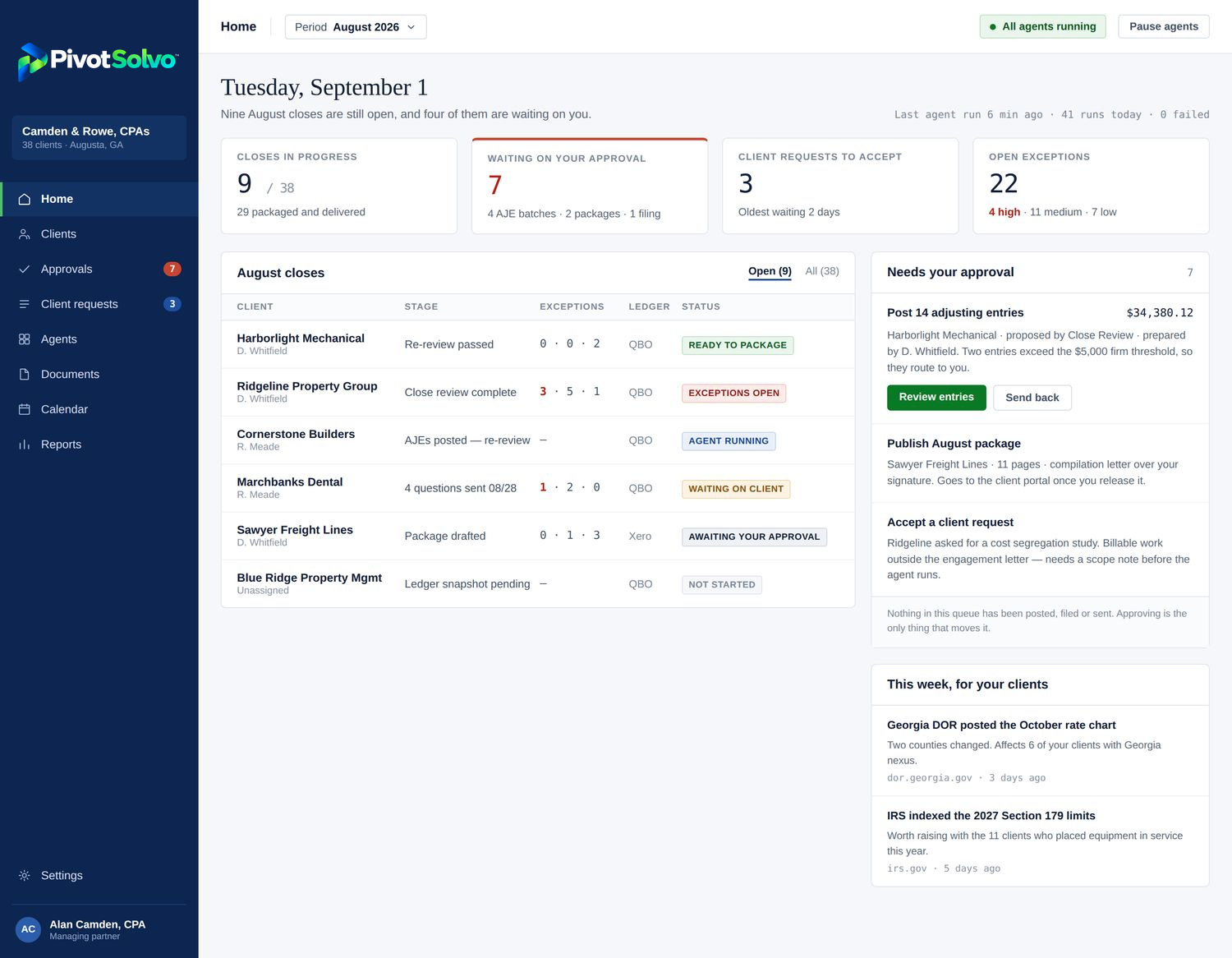
The firm across every client. Everything that needs a person is on the right, and the footer under it says how many items are waiting and that none of them have been posted or sent. Pause agents sits in the top bar — the kill switch, visible rather than buried three menus deep.
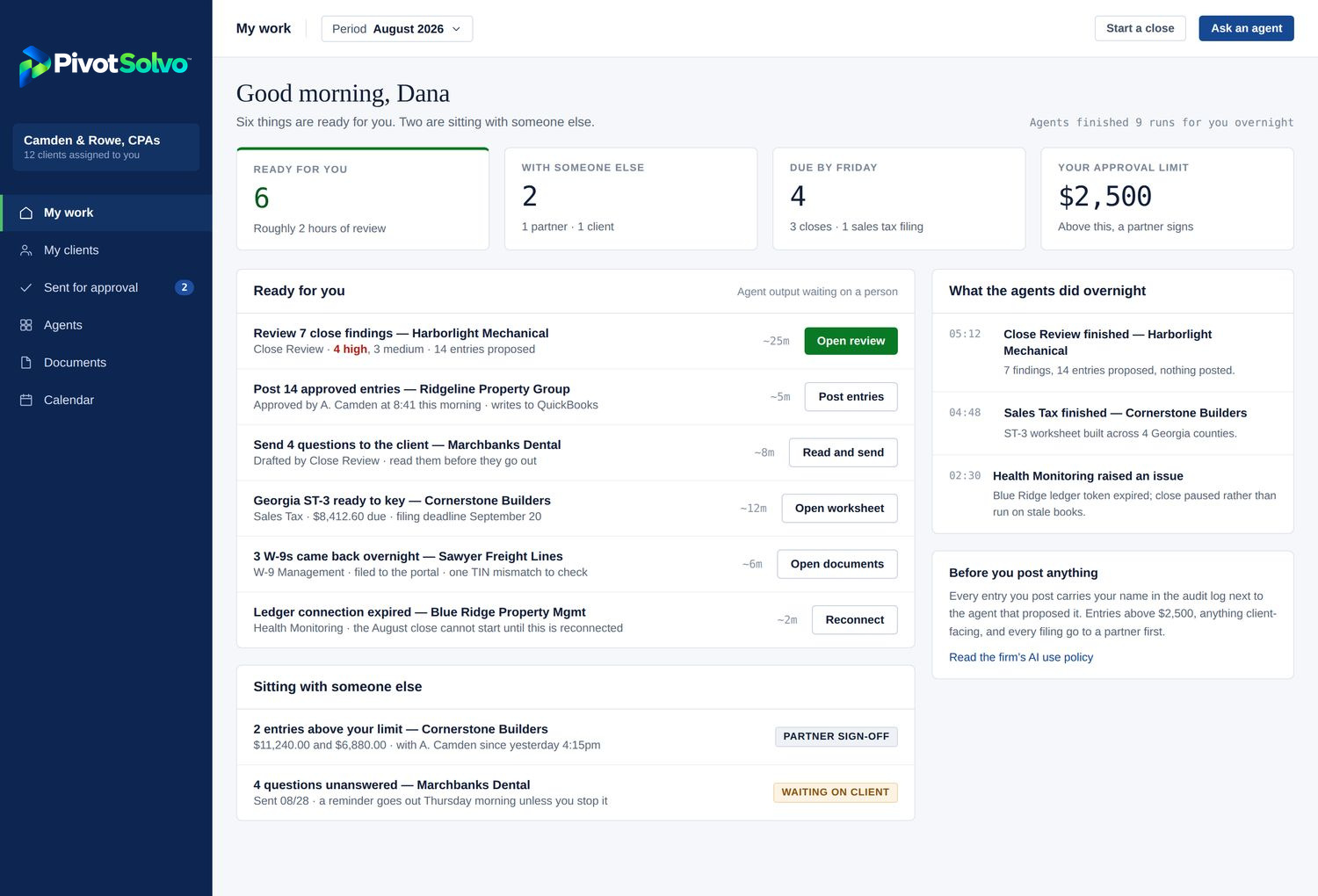
The same data asking a different question: what is ready for me, right now. A staff accountant's approval limit is a tile on their own screen, and the items above it are visibly sitting with the partner — the review hierarchy on screen rather than in a policy document.
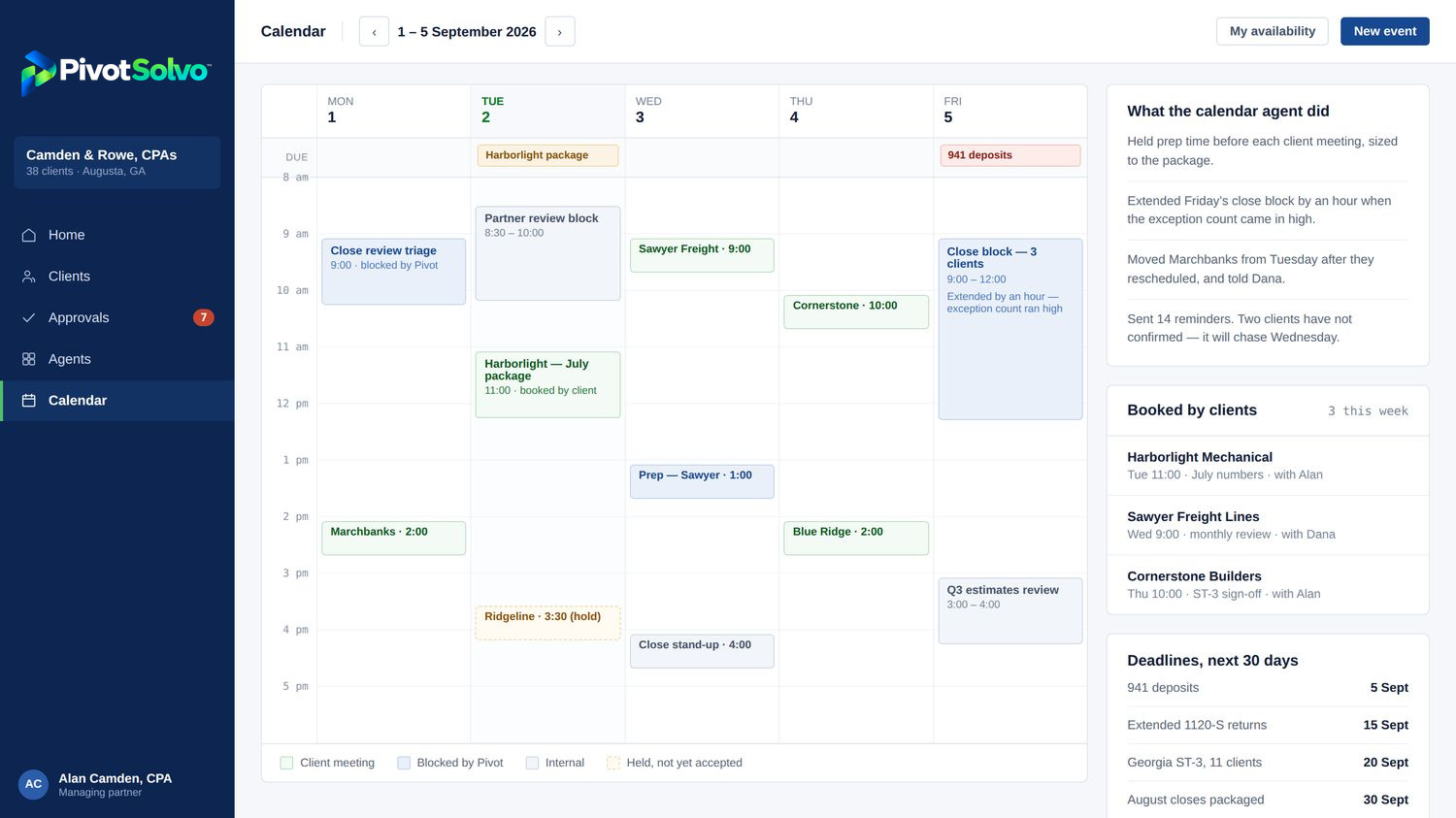
Client bookings, internal blocks, filing deadlines and the work the calendar agent scheduled itself — preparation time before each meeting, a close block extended when the exception count came back high. A slot held for a request nobody has accepted yet is drawn as a hold, not a meeting.
The client portal
Not a second system that has to be kept in step. The same record, filtered by the publish gate, wearing the subscribing firm's branding.
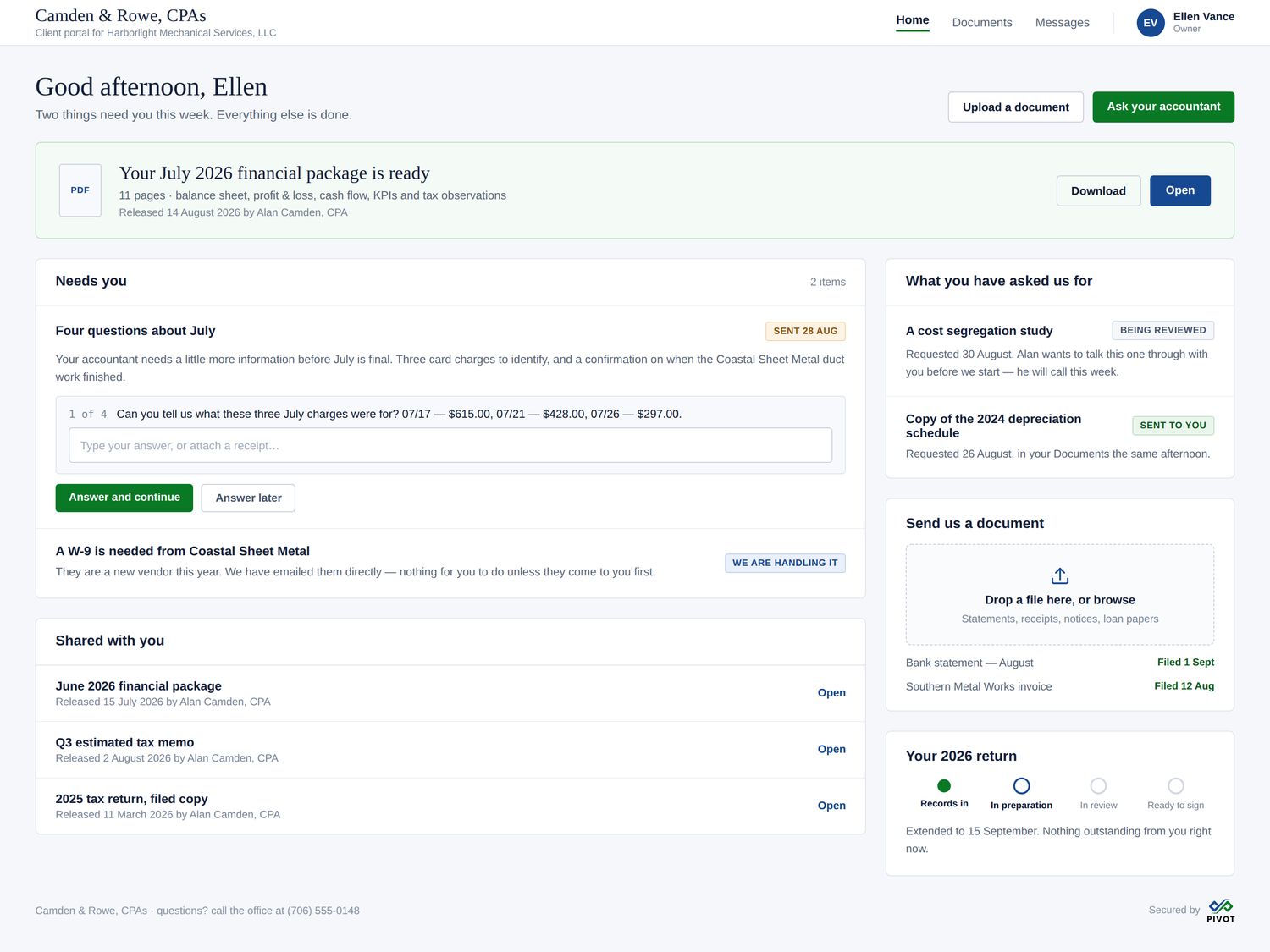
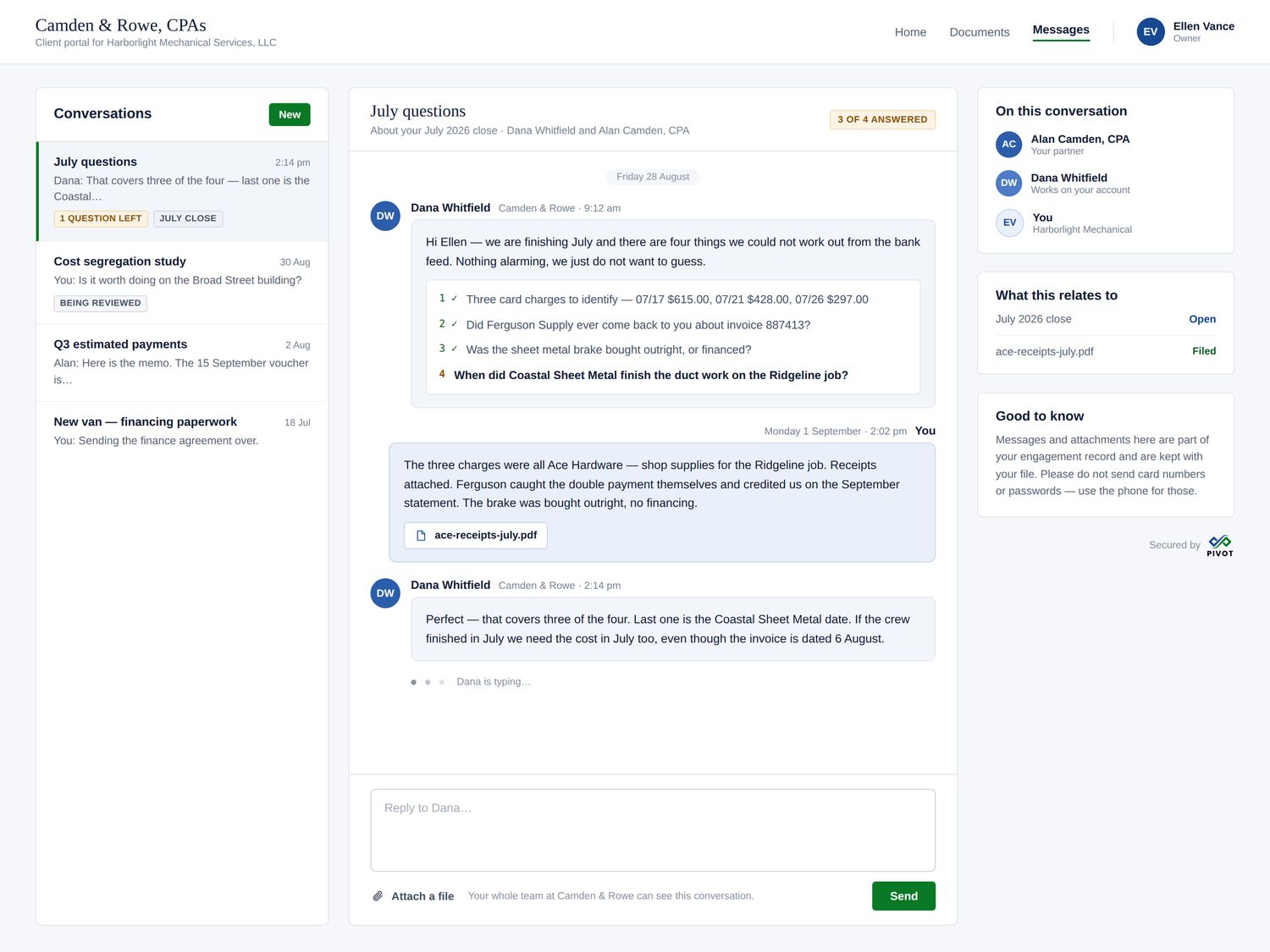
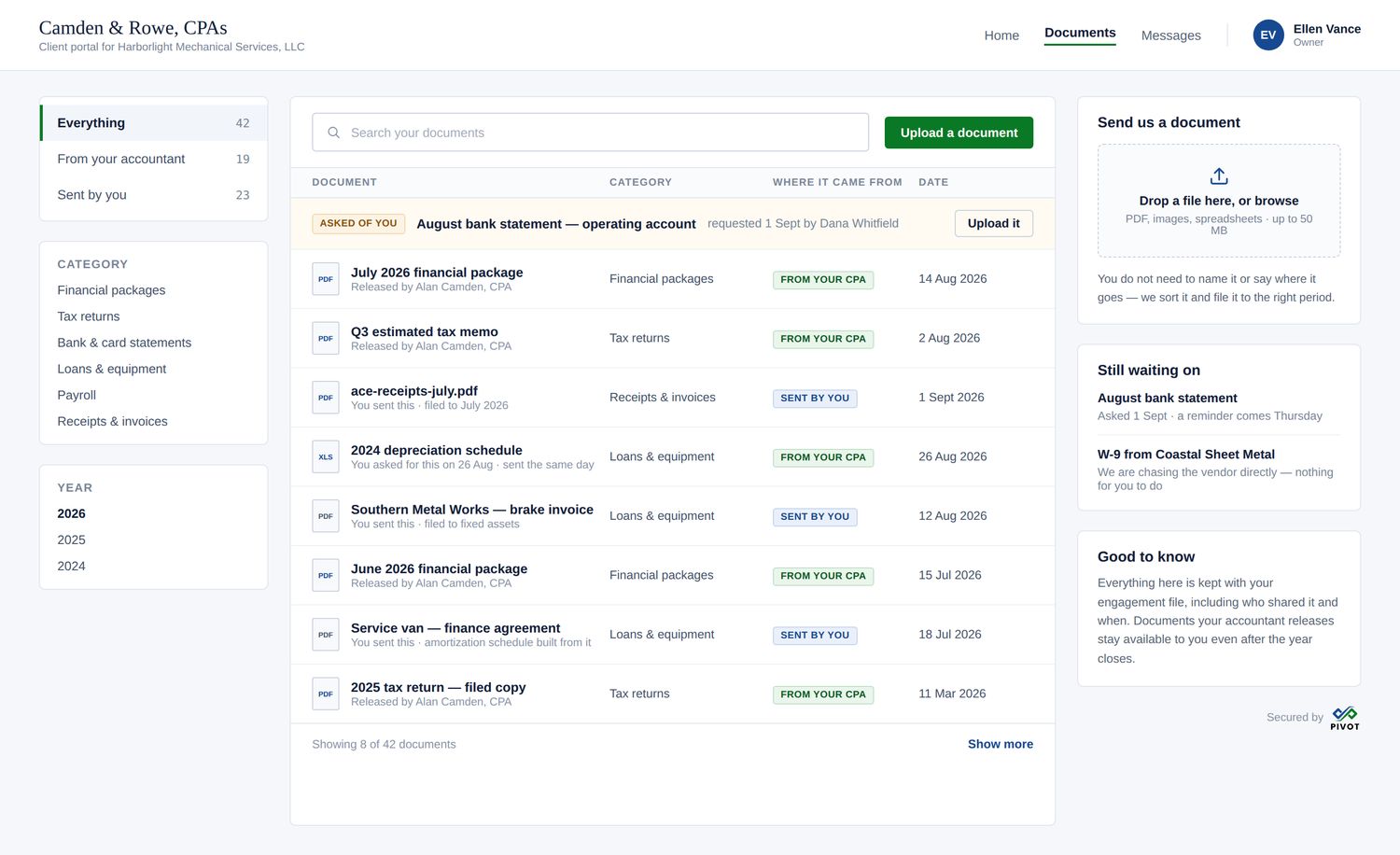
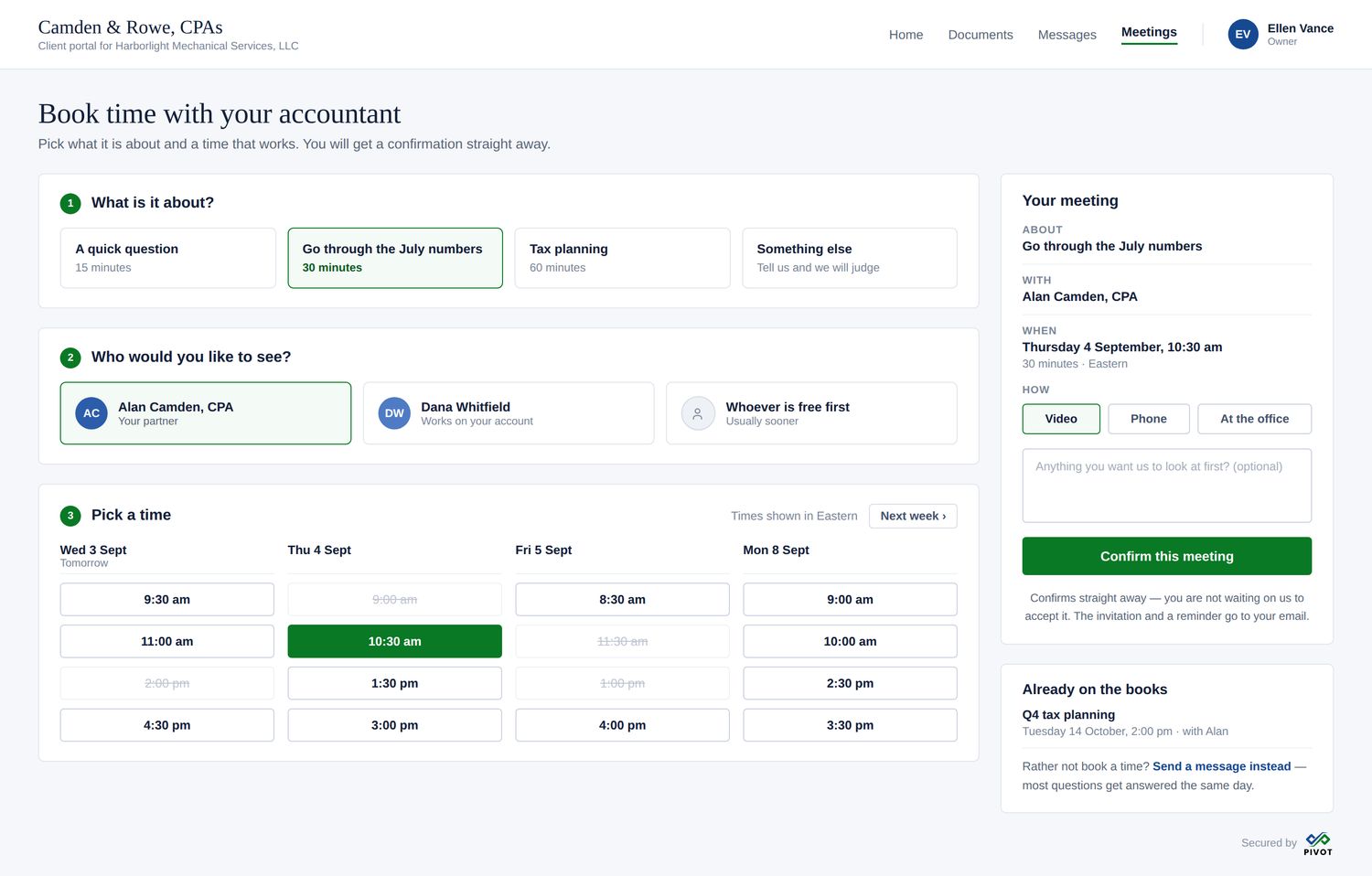
The client picks a purpose, a person and a slot from real availability, and it confirms immediately — because booking a meeting is one of the cheap, bounded requests a firm has chosen to auto-accept. A request for a cost segregation study on the same screen waits for a person and a scope note. Same gate, two different answers, decided per catalog item by the firm.
Connections
PivotSolvo connects to the services your firm already pays for, under your firm's own accounts, not ours.
That keeps the relationship, the contract and the billing where they belong. Each connection is authorized by your firm, its credentials sit in a managed key vault set up for your firm alone, and you can disconnect any of them in one step. If a connection stops working, the platform tells a person at your firm, in plain words, and asks them to reconnect it. Anything an agent would write through a connection goes through the same approval gate as every other action.
Tax preparation software, payroll providers, bank connections, receipt and document capture, file storage, and the firm mailbox and calendar.
Other ledgers, sales tax services, 1099 and W-2 filing services, text messaging and meetings, spend tools, and state filing services.
IRS online services, tax research libraries, CRM and email marketing, license tracking for your staff, and read-only imports from other practice tools.
This is a roadmap, not a promise of dates. We build a connection when a real firm needs it, and QuickBooks Online is the ledger connection today. Filing with a government authority stays a human step.
Underneath
Every subscribing firm gets its own database. Not a shared table with a firm column and a query everyone hopes is written correctly — a separate database, with row-level security inside it scoping a user to their firm, their role and, where it applies, the single client they are allowed to see.
| Layer | What it means for a firm |
|---|---|
| Per-firm database | Your client data sits in its own database, not a shared one. Separation is structural rather than a filter someone has to remember to apply. |
| Row-level security | Inside that database, a user sees only their firm, their role's scope and — for client portal users — their own client record. |
| Managed identity | Sign in with email or with your existing Microsoft account. Roles are partner, staff and bookkeeper, with approval limits attached. |
| Secrets in a vault | Accounting-system credentials are held in a managed key vault and never exposed to an agent, an export or a screen. |
| Append-only audit log | Every read, proposal, approval and write recorded and never edited in place. |
| White-labeling | Client-facing output carries your firm's branding, not ours — reports, packages, portal and messages. |
| Data portability | A full export of your data, whenever you want it, without asking us first. |
PivotSolvo connects to QuickBooks Online today. Additional accounting systems are on the roadmap and sequenced behind the work that helps firms on QuickBooks Online now — we would rather say that plainly than imply support that is not there.
Early access
We are onboarding a limited number of founding firms personally, ahead of general availability. Write to us and tell us about your book.